
Authorizing a representative with the Agenzia delle Entrate takes one of two forms: the Delega Unica for the tax portal, or a procura speciale for acts the portal does not cover. Giving JSBC access to your Italian Revenue Agency account is the essential first step that lets us check information on your behalf, receive notices, and make important filings for you. Here's exactly how to do it in four steps, and when a procura speciale is the right instrument instead.
What It Is
The Delega Unica is an authorization that permits JSBC to access relevant sections of your Agenzia delle Entrate (Italian Revenue Agency) account. When we have access to your account we can check information on your behalf, receive notices and make important filings for you. It is narrower than a full procura speciale, which grants authority to act for specific transactions beyond the tax portal.
This authorization is now completed exclusively online, through your own Agenzia delle Entrate profile. The paper form signed with a wet ink signature is no longer an available option.
You'll need this when completing Step 2: CNNFBA91L18G273K
A Problem for Non-Residents Without an Italian ID
Because the delega is now online-only, everything depends on being able to log into the Agenzia delle Entrate reserved area, and that access is tightly restricted. You cannot log in with a permesso di soggiorno or a foreign passport. You need either an Italian CIE (carta d'identità elettronica) or a SPID digital identity, and SPID itself can generally only be issued to someone who already holds an Italian identity document.
That combination has created a genuine problem for non-residents who own property in Italy but have never been issued an Italian ID card. They have Italian tax obligations, an Italian codice fiscale, and often an Italian property tax position that needs managing, but no way to authenticate into the very system that now holds the only path to authorizing an intermediary.
Let us know. We can prepare a special power of attorney (procura speciale) that allows us to resolve the matter in person on your behalf. It is unfortunate that this is the only way to handle it at the moment, but it works.
Step-by-Step Instructions
Access the Reserved Area
Log into the Agenzia delle Entrate "Area riservata" at iampe.agenziaentrate.gov.it using either:
- CIE: Electronic Identity Card
- SPID: Public System for Digital ID
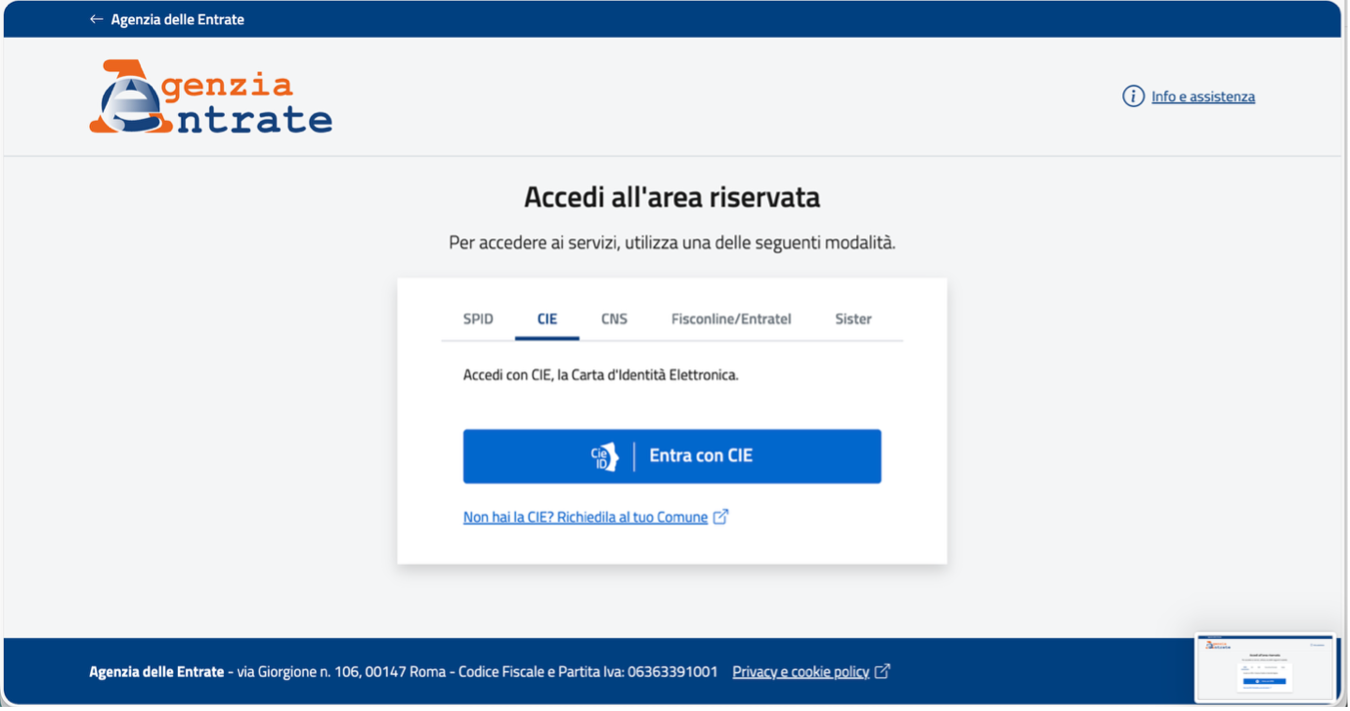
Both CIE and SPID require an Italian tax identification number, so make sure you have already obtained your Codice Fiscale before starting this process. That guide also covers getting one yourself, without an attorney or an accountant.
Navigate to Intermediary Delegations
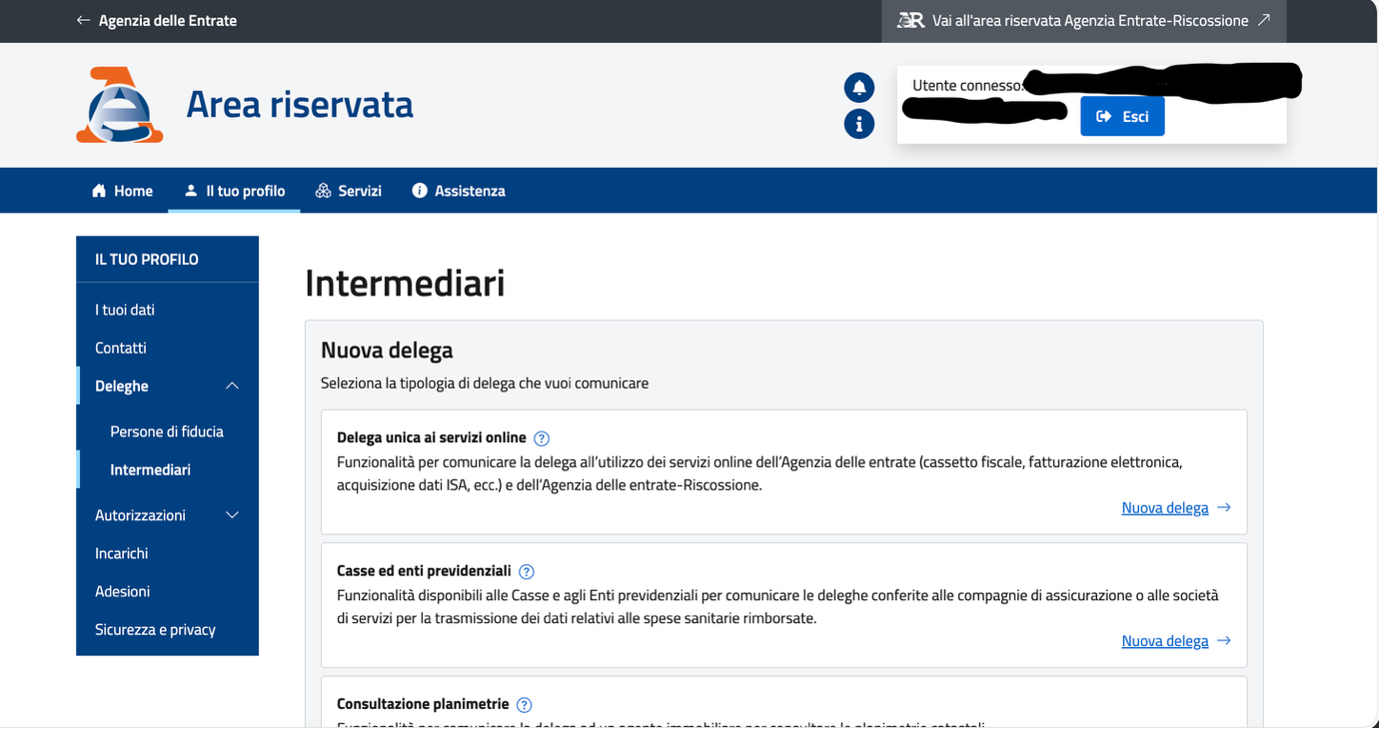
- Select Deleghe (Delegations) from the sidebar under "IL TUO PROFILO"
- Choose Intermediari (Intermediaries)
- Locate "Delega unica ai servizi online" and click "Nuova delega →"
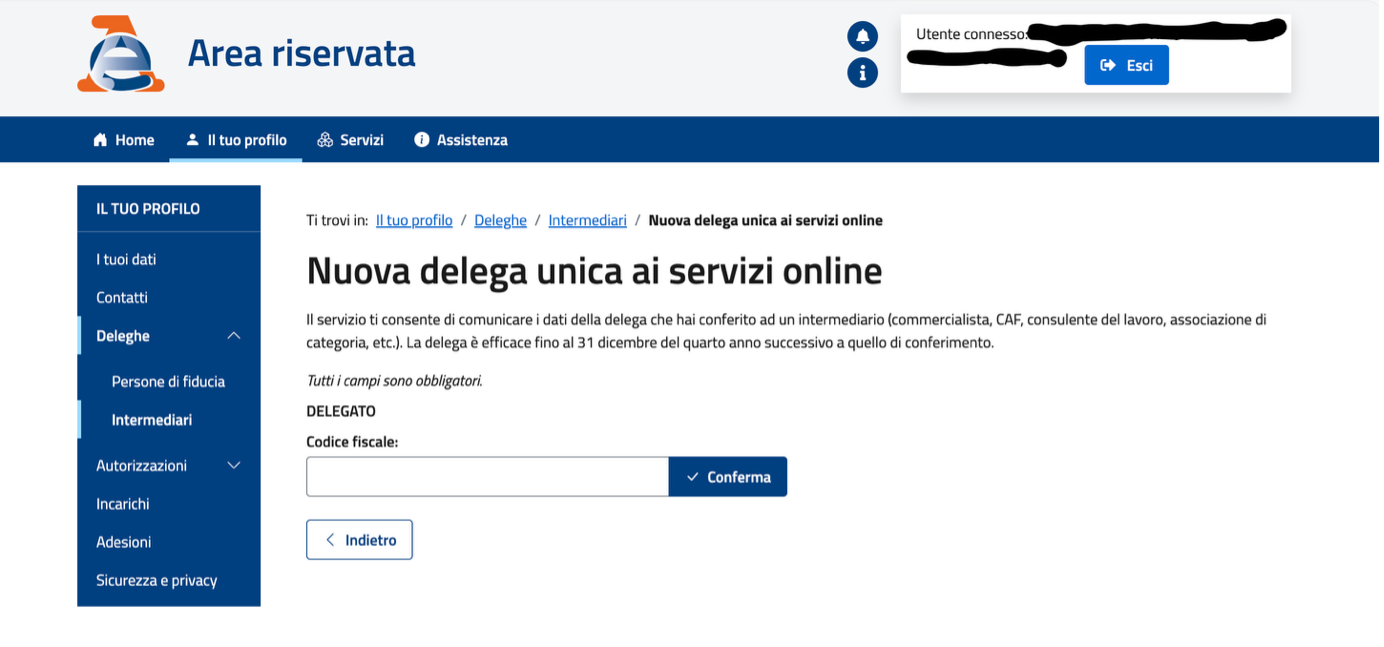
- Enter JSBC's Fiscal Code: CNNFBA91L18G273K
- Click Conferma (Confirm)
Select Authorized Services
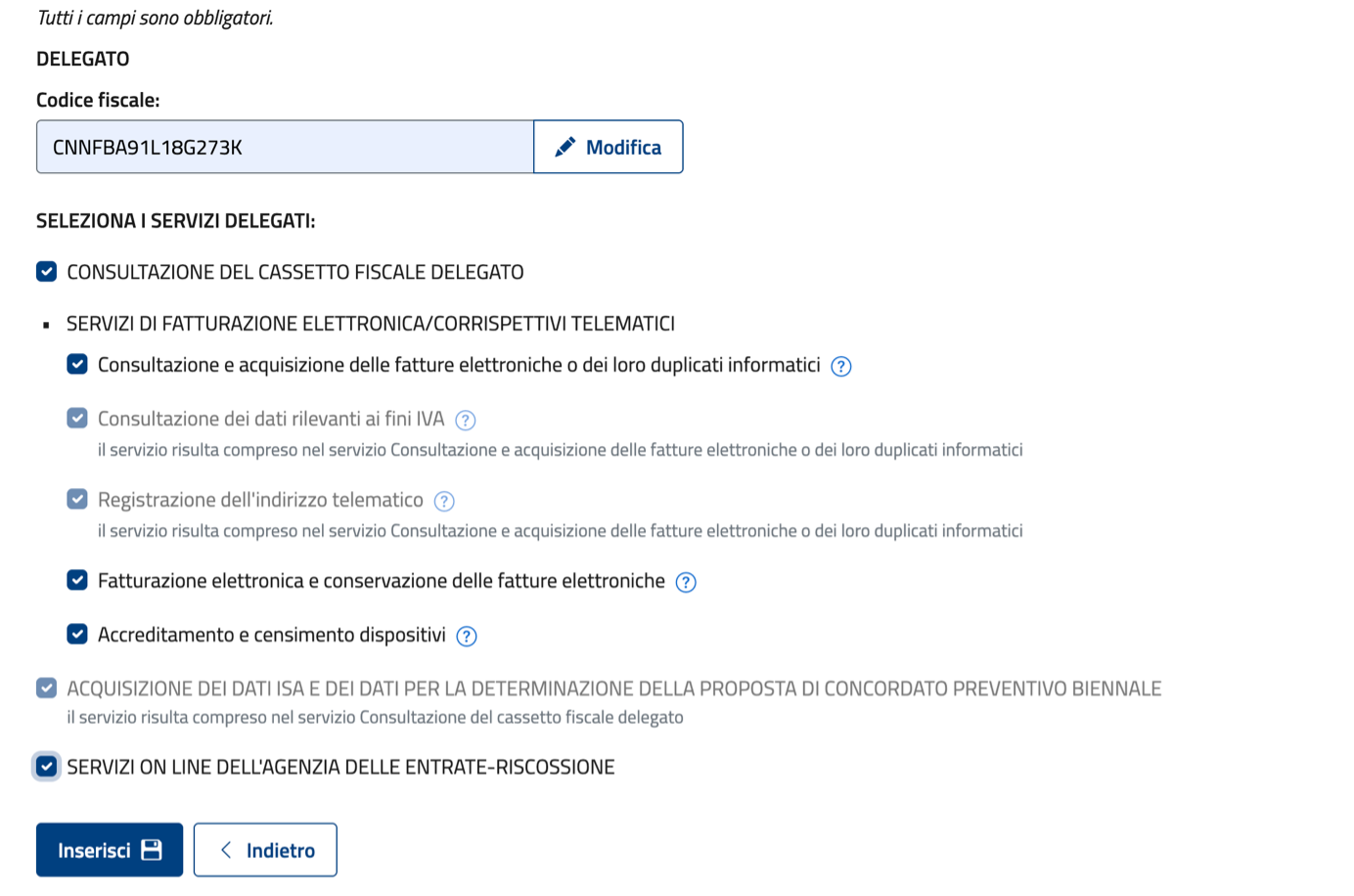
Check all required services:
- CONSULTAZIONE DEL CASSETTO FISCALE DELEGATO
- SERVIZI DI FATTURAZIONE ELETTRONICA
- ACQUISIZIONE DEI DATI ISA
- SERVIZI ON LINE DELL'AGENZIA DELLE ENTRATE-RISCOSSIONE
Click Inserisci to submit.
Final Confirmation
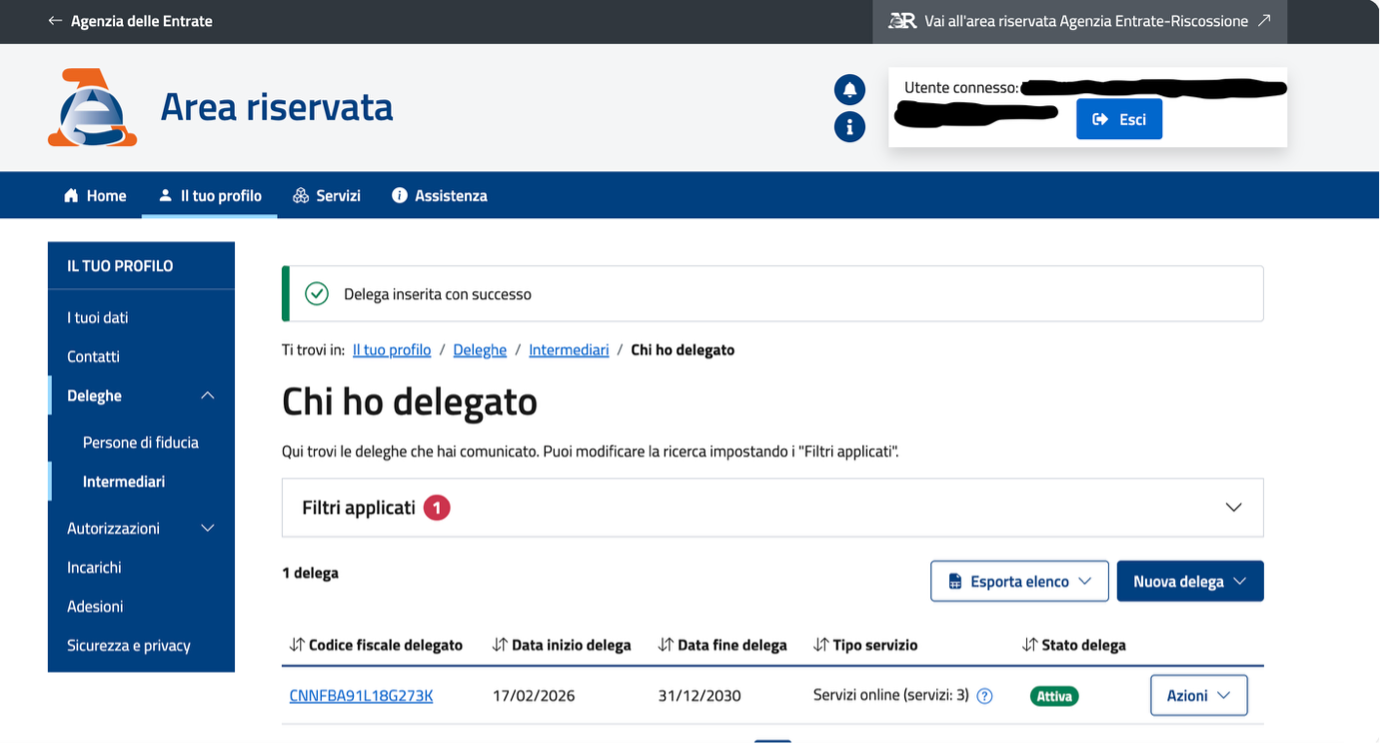
You should see the confirmation message: "Delega inserita con successo." Verify the status under "Chi ho delegato": the delegation should show Attiva (Active).
Practical Tips
- Duration: Valid until December 31st of the fourth year following authorization
- Management: Modify or revoke through the Azioni (Actions) dropdown menu on your dashboard
- No paper option: The delega can only be submitted online. If you cannot access the reserved area because you have no Italian CIE or SPID, contact us about a procura speciale instead
Procura speciale: when a delega is not enough
The Delega Unica covers the tax portal. It does not let anyone sign for you at a notary, close on a property, or accept an inheritance. For those acts, and for the non-resident who cannot get into the portal at all, the instrument is a procura speciale. Here is what it is, how it differs from a delega, and how an American executes one without flying to Italy.
What a procura speciale is
A procura speciale is a limited power of attorney under Italian law — it grants authority for one defined legal action, then expires automatically upon completion. It differs fundamentally from a general power of attorney and from the U.S. concept of a durable power of attorney.
Common uses of a procura speciale
Real Estate Transactions
Sign purchase or sale deeds (rogito) before an Italian notary when you can't be physically present
Company Formation
Sign the Atto Costitutivo for an SRL or other Italian entity on behalf of a U.S.-based shareholder
Inheritance Proceedings
Accept or renounce an Italian inheritance, sign succession declarations
Court / Tax Matters
Authorize representation in Italian administrative proceedings or notarial acts
Procura Speciale vs. Procura Generale vs. Delega
| Document | Scope | Notary Required | Best For |
|---|---|---|---|
| Procura Speciale | Single defined act | Yes | Real estate, company formation, inheritance |
| Procura Generale | Multiple / ongoing acts | Yes | Business management, asset management abroad |
| Delega | Minor administrative tasks | No | Mail pickup, document submission (no legal standing at notary) |
Italian Procure vs. U.S. Powers of Attorney
Key differences Americans should understand:
- Incapacity: Italian procure automatically expire if the principal becomes incapacitated — unlike durable U.S. POAs which survive incapacity
- Medical authority: Healthcare decisions are handled separately in Italy via advance directives (DAT)
- Formality: Italian procure require notarization and an apostille for use on U.S. documents
- Cross-border validity: U.S. powers of attorney need legalization (apostille) and certified Italian translation to be accepted in Italy
How to Execute One from the U.S.
If you're in the U.S. and need a procura speciale for an Italian transaction:
- Sign before a U.S. notary public
- Obtain a state apostille (authenticates the notary's signature for foreign use)
- Have the document certified-translated into Italian
- Send to Italy for use by your authorized representative
When You Need One with JSBC
For company formations, real estate purchases, and certain tax proceedings before the Italian tax authority (Agenzia delle Entrate), JSBC may request a procura speciale to act on your behalf before Italian authorities. This is standard practice for Americans completing Italian transactions remotely. We provide the exact text needed and guide you through the U.S. notarization and apostille process.
See also: Getting Your Codice Fiscale — often needed before a procura speciale can be executed.
Frequently Asked Questions
What is the Delega Unica for the Agenzia delle Entrate?
The Delega Unica is an authorization that permits JSBC to access relevant sections of your Agenzia delle Entrate (Italian Revenue Agency) account. With that access, JSBC can check information on your behalf, receive notices, and make important filings for you. It is narrower than a full procura speciale, which grants authority to act for specific transactions beyond the tax portal.
What do I need before starting the online authorization?
You log into the Agenzia delle Entrate reserved area using either CIE (Electronic Identity Card) or SPID (Public System for Digital ID), and both require an Italian tax identification number, so obtain your Codice Fiscale first. You will also need JSBC's Fiscal Code, CNNFBA91L18G273K, when entering the new delegation.
How long does the Delega Unica stay valid, and can I revoke it?
The authorization is valid until December 31st of the fourth year following authorization. You can modify or revoke it at any time through the Azioni (Actions) dropdown menu on your dashboard.
How do I confirm the delegation was successful?
After submitting, you should see the confirmation message "Delega inserita con successo." Then verify the status under "Chi ho delegato": the delegation should show as Attiva (Active).
What if I cannot complete the Delega Unica online?
There is no longer a paper alternative. The delega is submitted online only. The common blocker is access: the Agenzia delle Entrate reserved area cannot be entered with a permesso di soggiorno or a foreign passport, only with an Italian CIE or a SPID, and SPID generally requires an Italian identity document. This leaves non-residents who own Italian property but hold no Italian ID card unable to authorize an intermediary through the portal. If that is your situation, contact JSBC: we can prepare a procura speciale (special power of attorney) so we can resolve the matter in person on your behalf.
What is a procura speciale?
A procura speciale is a limited power of attorney under Italian law. It grants authority for one defined legal action and then expires automatically once that act is completed. It differs fundamentally from a general power of attorney and from the U.S. concept of a durable power of attorney.
When do Americans need a procura speciale?
It is commonly used to complete Italian transactions without being physically present: signing real estate purchase or sale deeds (rogito) before an Italian notary, signing the Atto Costitutivo for an SRL or other Italian entity, accepting or renouncing an Italian inheritance, and authorizing representation in Italian administrative or notarial proceedings.
How does a procura speciale differ from a procura generale or a delega?
A procura speciale covers a single defined act and requires a notary. A procura generale covers multiple or ongoing acts and also requires a notary. A delega covers only minor administrative tasks, requires no notary, and has no legal standing at a notary.
How do Italian procure differ from U.S. powers of attorney?
Italian procure automatically expire if the principal becomes incapacitated, unlike durable U.S. POAs that survive incapacity. Medical decisions are handled separately in Italy through advance directives (DAT), and Italian procure require notarization and an apostille. A U.S. power of attorney needs legalization (apostille) and a certified Italian translation to be accepted in Italy.
How do you execute a procura speciale from the U.S.?
Sign the document before a U.S. notary public, obtain a state apostille that authenticates the notary's signature for foreign use, have the document certified-translated into Italian, and then send it to Italy for use by your authorized representative.
If you run into any issues completing the Delega Unica, our team is available to guide you step by step.
Book a Free Consultation →The information in this article is provided for general informational purposes only and does not constitute financial, legal, tax, or accounting advice. Any opinions expressed are solely those of the author and do not necessarily reflect the views of JSBC. You should not act or refrain from acting on the basis of this content without first seeking the advice of a qualified professional regarding your particular circumstances.